Everyone's Publishing Open Source. Almost Nobody Can Run It.
You found the perfect open-source project on GitHub, then hit the README. Here is why running a repo is still a developer skill, and how to run one anyway.
In this post
Tens of millions of people joined GitHub in the last year, and many of them now publish code an AI wrote most of. Ask most of them to run someone else’s project, and the magic stops at the README.
This post is about that gap: the new wave of solo open-source builders, why running a GitHub project is still a developer-only skill, and how to run one anyway.

A new wave of solo open-source builders
GitHub’s Octoverse 2025 report counted more than 36 million new developers in a single year, roughly one every second, and 121 million new repositories. It named vibe coding as one of the year’s notable trends. More than 1.1 million public repositories now use an AI model’s SDK, nearly 700,000 of them created in that one year.
Not all of those new accounts belong to professional developers. Plenty belong to people who learned what a repository is last spring, because an AI tool told them to make one. They build alone, they publish because publishing is free, and some of what they publish is genuinely useful.
The clearest example is OpenClaw, a personal AI assistant that runs on your own devices. It started as a weekend project in November 2025, and GitHub calls it the fastest-growing project in its history, with more than 390,000 stars today. Its maintainers say a good share of the first-time contributions they merged came from non-developers, often working with an agent.
So the publishing side has opened up. The running side has not.
Why is running a GitHub project still a developer skill?
Open a typical README and read it as someone who is not a developer. Every line is a separate skill.
- “Clone the repository.” You need Git, and you need to know what cloning is.
- “Requires Node 22” or “Python 3.11+.” You need the right version of a language installed, and not the one your computer already had.
- “Install dependencies.” Hundreds of packages download, and sometimes one fails with an error written for someone else.
- “Copy
.env.exampleto.envand fill in your keys.” You need to know what an environment variable is and where to get each key. - “Start a database.” Which one, where, and how.
- “Or just use Docker.” Now you are installing a container runtime to avoid installing everything else.
- “Open localhost:3000.” It runs, on one machine, until you close the laptop.
- “For production, deploy it.” The README stops here. Your problems do not.
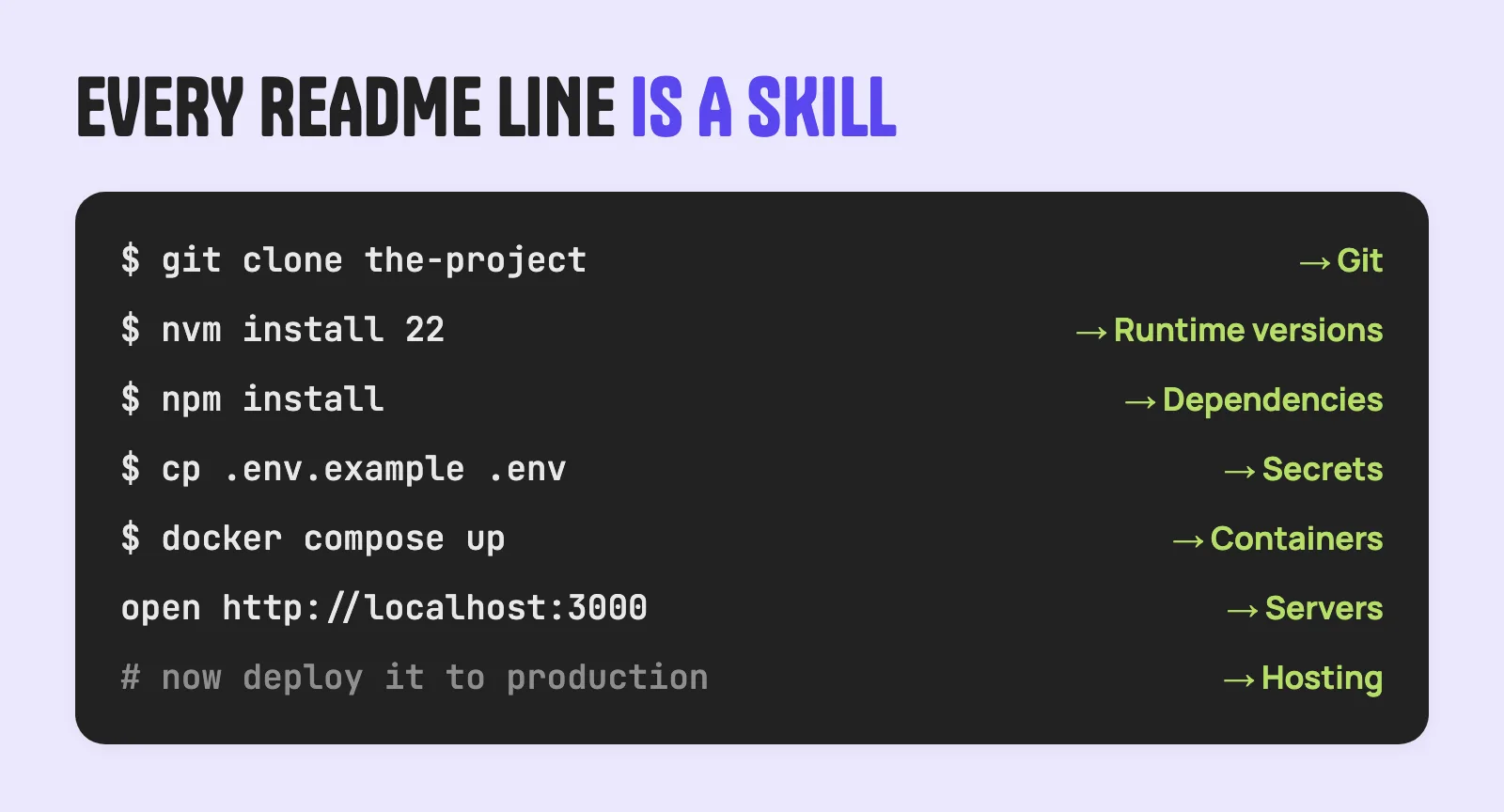
On Hacker News, a reader once asked for help running a research project, and a commenter had to explain that the project’s environment file was meant for a tool to read, not as instructions for a person. That is the whole problem in one sentence. READMEs are written by developers, for developers, assuming a toolbox the reader may not have.
It is not only humans who struggle. In EnvBench, a 2025 research benchmark of hard-to-configure repositories, the best automated approach managed to set up only 6.69% of 329 Python projects and 29.47% of 665 Java and Kotlin projects. If setup defeats AI agents that often, it is no wonder it defeats people.
Even popular, well-funded projects feel this. OpenClaw’s issue tracker holds more than 1,500 issues with “install” in the title, and one open issue asks to simplify the setup screen for non-technical users. When Anthropic introduced one-click Desktop Extensions in 2025, it explained that local MCP servers had “remained largely inaccessible to non-technical users” because of runtimes, hand-edited configuration files and dependency conflicts.
What non-developers do today
People have found ways around the README. Each one helps, and each has a catch.
- A hosted version. Many projects offer a paid cloud edition, and hosting companies move fast to sell one-click versions of viral projects. Within months of OpenClaw taking off, providers like Hostinger offered managed installs. Great when it exists. Most projects never get one.
- Deploy buttons and templates. Railway’s template marketplace passed 1,000 templates in 2025. But templates are often maintained by someone other than the project, and buttons go stale: when Heroku ended its free plans in 2022, a lot of “Deploy to Heroku” buttons stopped being a free way in.
- Launchers and app stores. Tools like Pinokio (for AI apps), umbrelOS and CasaOS give you a catalogue and an install button. They work well for the apps in their catalogue, on the hardware you run them on.
- Self-hosting. A large, generous community does this, but it is a technical hobby. In the 2025 selfh.st survey of more than 4,000 self-hosters, 89% used Docker and about 81% worked in technology.
- Asking a developer friend. Still the most common answer, and the one that scales worst.
How to run a GitHub project when you’re not a developer
Here is a practical way to run a GitHub project today, using the AI coding agent you may already have, such as Claude Code, Cursor or Codex.
- Check that it is worth running. Look at the licence, when it was last updated, and whether issues get answers. A project nobody maintains is a project you will maintain.
- Check that it is safe. You are about to run a stranger’s code on your machine. Prefer well-known projects, read what the install script does, and never paste real passwords or company keys into a project you do not trust.
- Hand the README to your agent. Open an empty folder in your coding tool and say: “Clone this repository, read the README, and get it running on my machine. Explain each step before you do it.” The agent installs the right language version, the dependencies and any database, and tells you what it is doing.
- Handle keys deliberately. When the project needs API keys, ask the agent where each one comes from and what it allows. Put them only where the project expects them, never in the code.
- Ask what it needs to stay up. Once it runs, ask: “What would this need to run for other people, not just me?” The answer is your list for the next step.
That gets you from README to “it runs on my laptop”. For a lot of projects, that is enough. For anything your team, family or customers should use, it is not.
From “it runs on my laptop” to “my team can use it”
This is where CloudGrid fits. Once your coding tool has the project working, it can plug it into the Grid, and the Grid gives it what the README told you to set up by hand: a runtime, a database, a cache, file storage, AI models without your own keys, a vault for secrets, and a stable address you can share.
- Connect your tool once. One sentence works in almost any AI tool:
fetch https://cloudgrid.io/agents and plug this in. Tool-specific setup is on the plug page, and Whatever you use, it works covers tools we have not listed. - Say “plug this in.” Your agent describes what the project needs in a small manifest, and the Grid builds it and makes it live. The language does not matter much: if your coding tool can get the project running, it can plug it.
- Keep the keys out of the code. Secrets go into the Grid’s vault and are injected when the project runs.
- Choose who can open it. Private, shared with your team, a link, or public.
- Try it locally first if you like. Run it locally shows how to work on your machine with the Grid’s shape around you, on masked copies of real data.
That is the whole route for someone else’s open-source project. Give the repository to Claude Code or a similar tool, let it get the project running, and tell it to plug the project into your grid. The README’s last line, “for production, deploy it”, becomes one sentence.
And when a project is already on the Grid, there is no README at all. You pick it up: CloudGrid makes your own copy with a link back to the original, without the original’s secrets, so you add your own and plug it. How the Grid works explains picking up in a minute.
What publishing should mean now
If you publish open source, the new readers are not all developers. A few small things make a big difference:
- Write the README for two readers: a person and an agent. Plain steps, exact versions, and every required key named with where to get it.
- Ship a
.env.examplewith comments, not just names. - Say what it needs to run. A database? A schedule? A model? A portable manifest helps here. A CloudGrid
cloudgrid.yamldescribes what an app needs, holds no secrets, and is safe to commit to any repository. - Offer a way to use it without running it. A live demo link is worth a thousand install instructions.
Publishing made your work visible. Making it runnable makes it useful.
Key takeaways
- Publishing open source is easier than ever. Tens of millions of new GitHub accounts and a new wave of AI-assisted solo builders prove it.
- Running open source is not. Every README line assumes a developer skill, and even AI agents fail at hard setups.
- Today’s workarounds (hosted versions, deploy buttons, launchers, self-hosting) each help, but cover only part of what people want to run.
- Your coding agent can get most projects running locally, if you check safety and handle keys with care.
- To share it, the project needs a home with a runtime, data and secrets, and that is the step the Grid makes one sentence long.
Running someone else’s project and taking your own past the app builder hit the same wall. We wrote about the second in Outgrowing the App Builder, and about who is publishing in the first place in What People Are Actually Building in 2026.