Outgrowing the App Builder: The Technical Cliff Nobody Warns You About
You left the app builder for Cursor or Claude Code and got your code back. Then came hosting, databases and env vars. Here is the cliff, and the way across it.
In this post
You built your first app in an evening with a prompt-to-app builder, and it felt like magic. A few weeks later you moved to an AI coding agent, the code is finally yours, and you are staring at a word you never wanted to learn: deployment.
This is one of the most common paths in AI building right now. It has three stages, and the third one is a cliff. Here is why people make the move, what they gain, what they fall into, and how to deploy a vibe-coded app without becoming a DevOps engineer.

Stage one: why app builders are where most people start
Prompt-to-app builders like Lovable, Bolt, Replit, v0 and Base44 earned their popularity. You describe an app, you watch it appear, and you get a link. Several of them include a database, sign-in and hosting, so you never have to think about any of it.
That is not a small thing. It is the reason millions of people who never wrote code now have working software. Lovable alone was seeing more than 100,000 new projects a day by mid-2025. Even people who later leave say the zero-setup start was the best part. One builder who wrote a migration guide from Lovable to Claude Code still recommends prototyping in Lovable.
Why do people outgrow app builders?
The reasons repeat across threads and write-ups.
Costs that grow with every change. Builders charge per message, credit or unit of effort, and editing a growing app costs more than starting one. After Replit changed its agent pricing in 2025, users told The Register about bills jumping from under $200 a month to $1,000 in a week. Replit itself acknowledged that effort-based pricing can cost more over a project’s life. Coding agents are not immune: Cursor apologised for a confusing pricing change the same year. But in a builder, the meter is tied to every edit you make.
The fix loop. Product coach Teresa Torres describes the “doom loop”: the agent says it fixed the bug, and the bug is still there. In a chat-only builder, there is no other way in. You prompt again.
Wanting the code to be yours. As an app becomes important, people want it in their own repository, open to any tool, reviewable by anyone.
The backend is part of the builder. Lovable’s own documentation is clear that moving from its built-in backend to your own database is not a one-step move: you export the data, restore it elsewhere, and set up sign-in, storage and secrets again. That is a fair design choice for an integrated product. It also means the more you build, the more there is to move.
If you are weighing this, we have honest comparisons with Lovable, Bolt, Replit, v0 and Base44.
Stage two: moving to an AI coding agent
So people move to Cursor, Claude Code, Codex or Antigravity. And it is genuinely better in the ways they hoped.
- Real files. The project is a folder you own. Any editor can open it.
- Any library, any shape. A background job, a second service, an unusual database. Nothing is off the menu.
- Better debugging. The agent can read the whole codebase, run the app, and see the actual error.
- Git. History, branches, and a way back.
The typical move is short: connect the builder’s project to GitHub, clone it, and open it in the agent. Then you run it on your own machine, and it works.
That is the moment the cliff appears.
Stage three: the cliff
Here is what nobody mentions in the migration guides. The builder was not only writing your code. It was quietly running it. As one migration write-up from Axon points out, switching tools moves the editor, while hosting, the domain and the backend stay behind until each one is moved on its own.
The clearest account of the cliff comes from Andrej Karpathy, who coined the term “vibe coding.” In 2025, Karpathy wrote up building MenuGen, a small app that turns a photo of a menu into pictures of each dish. The local demo was the fun part. The deployed app was, in Karpathy’s words, “a bit of a painful slog.” At the moment it felt 80% done, it turned out to be closer to 20%.
The rest of the work looked like this, and it will look familiar.
Hosting: where does it run, and does it keep running?
Your laptop is not a server. The app needs somewhere that runs it when your laptop is closed, at an address that does not change. That usually means choosing between a frontend host, a server host, or a cloud account, and each has its own idea of what an app is.
The database: why your data disappears
Locally, data often lives in a file or in memory. On many hosts, that file is wiped on every restart or is not allowed at all. You need a managed database, which means another provider, another account, and a connection string.
Environment variables and secrets, in plain words
An environment variable is a setting that lives outside your code, such as the key that lets your app talk to OpenAI or Stripe. Locally, it sits in a file like .env.local. That file is deliberately kept out of Git, because keys should never be shared. Which means that when you deploy from Git, the keys are not there, and the app breaks.
This is exactly what happened to Karpathy. The build failed on Vercel, and it took about an hour to find out that the real cause was missing keys that had to be added by hand in the host’s settings.
The opposite mistake is worse. GitGuardian counted 28.65 million secrets leaked in public GitHub commits in 2025, up 34% in a year, with keys for AI services up 81%.
Cloud accounts and the surprise bill
Every service wants its own account and its own card. A key that leaks can be expensive: in 2026, The Register reported on a three-person startup whose compromised Google Cloud key ran up more than $82,000 in 48 hours, against a normal bill of about $180 a month.
Sign-in, domains and updates
Sign-in providers often require a real domain in production, so you buy one and edit DNS records. Karpathy had to do exactly that before sign-in would work. Then every update needs to land without breaking the link people already have.
None of this is hard for an experienced developer. All of it is a second job for everyone else.
How do you deploy a vibe-coded app today?
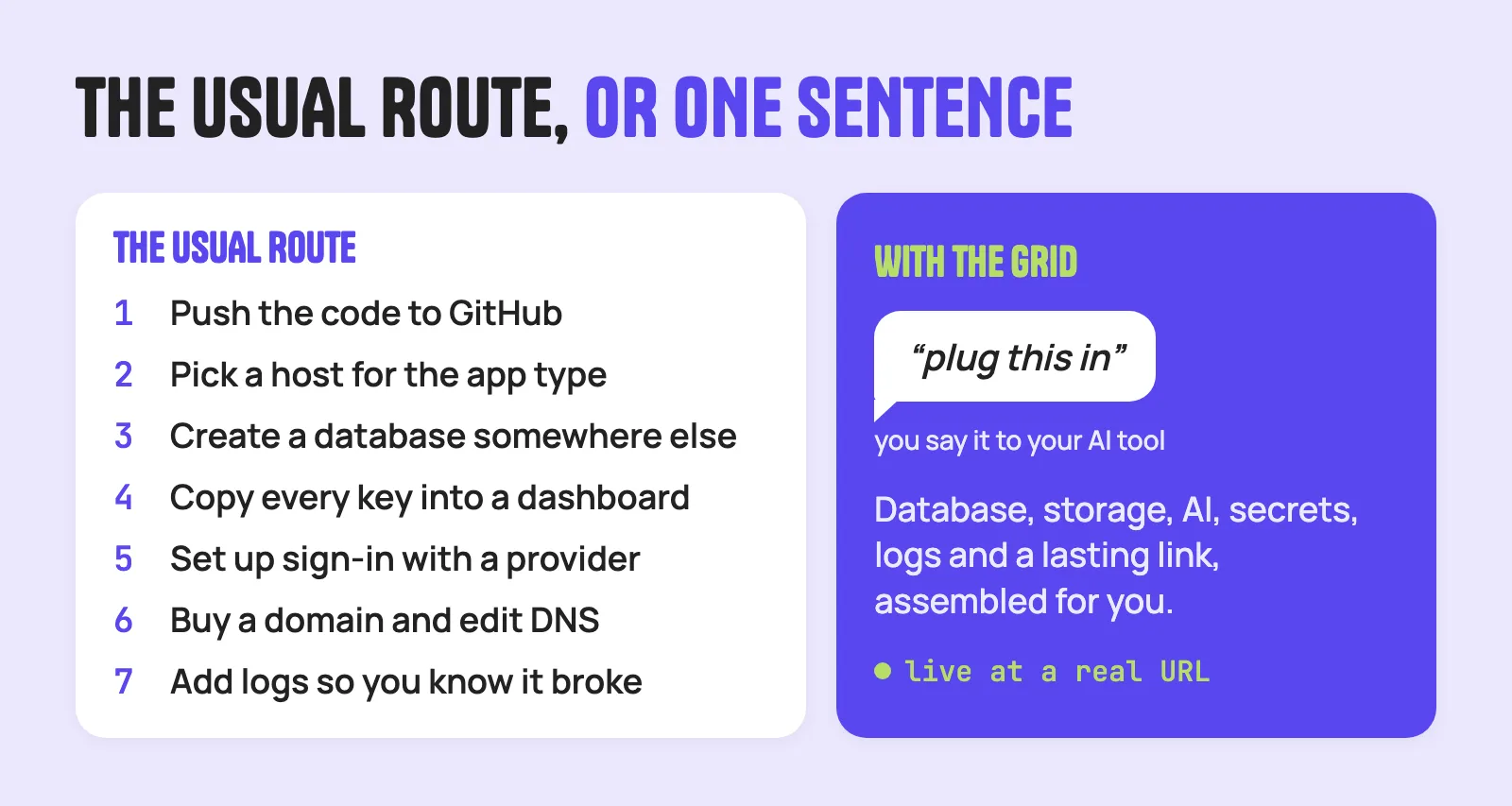
The honest, standard route in 2026 looks like this:
- Push the code to GitHub.
- Pick a host that fits the app type: a frontend host for a static site, a server host for anything with a backend.
- Create a managed database with a separate provider and copy its connection string.
- Add every API key and setting as an environment variable in the host’s dashboard.
- Set up sign-in with an auth provider, which may require a custom domain.
- Buy and connect the domain, and update DNS.
- Set up logs or error tracking, so you know when it breaks.
It works. Millions of apps run this way. But it is five or more accounts, a dozen settings pages, and a mental model built for engineering teams. Even the builders know it: Bolt called this setup “the hidden tax every builder pays before going live.”
How CloudGrid removes the cliff
CloudGrid was built for exactly the person standing at this edge. You keep the coding agent you moved to. You add one connection, once, and from then on going live is one more sentence in the same conversation.
- Connect once. Ask Claude Code to install the CloudGrid MCP server, and it sets itself up. The same works from Cursor, Codex or Antigravity. Each tool’s setup is on the plug page.
- Say what the app needs. “Add a database.” “Add AI.” The Grid provisions it and connects it. There is no connection string to copy and no AI key to collect.
- Plug it in. Say “plug this in”, and it goes live at a real URL. For many apps that takes about thirty seconds, depending on what you are plugging and how big it is.
What you stop doing:
- No second host, database provider or cloud account. Database, cache, file storage and AI come with the Grid. Build an app with a database shows the whole flow.
- No keys in files. Secrets live in a vault, are injected when the app runs, and never sit in your code or chat.
- No broken links. Every update lands at the same address. Every version is kept, so you can roll back.
- No guessing. Logs are there for every app, and you choose who can see it: private, link only, or public. Control what you made covers the week-two questions.
And if you are still in a builder: if you can export the code, you can plug it. Bring it into a coding tool, connect CloudGrid, and make it live.
What should you check before you switch tools?
Whatever you choose, ask these questions before you leave an app builder:
- Can I export all of the code? Frontend and backend.
- Where does my data live, and can I export it? Get a copy before you change anything.
- What was the builder doing for me? Hosting, database, sign-in, file storage, domain, scheduled jobs. Make a list.
- Which secrets does the app use? Note every key, and plan where each will live. Never in the code.
- Who uses it today? Make sure the link they have will keep working, or tell them when it moves.
Key takeaways
- App builders are a great start. They hide the infrastructure, which is exactly why they are fast.
- People outgrow them because of costs that scale with edits, fix loops, and wanting to own the code.
- Coding agents give control back, but not the hosting, database, secrets and domain the builder used to run.
- That is the cliff: deployment is still a stack of accounts and settings designed for engineers.
- The way across is a home that your coding agent can set up for you, from the same conversation.
This cliff is the sharpest version of a wider problem we call the last mile of software. And the same wall shows up from the other side when you try to run someone else’s project, which is the story of Everyone’s Publishing Open Source. Almost Nobody Can Run It.